Best Brother ScanNCut (2026): SDX85C vs SDX125E vs SDX325 Compared
The best Brother ScanNCut is the SDX325, about $900, with 1,303 built-in designs, 140 quilt patterns, 17 fonts, a Thin Fabric Auto Blade and wireless. The SDX125E (about $450) is the best value for quilters with 100 quilt patterns, and the SDX85C (about $299) is the budget entry with the same scanner.
Every current Brother ScanNCut shares the feature that sets the line apart: a built-in scanner that reads drawings, templates and printed fabric so you can cut exactly what you see, all from the machine's touchscreen with no computer required. For quilters and applique makers, the Brother SDX325 at about $900 is the one to buy. It adds a Thin Fabric Auto Blade for quilting cotton, 140 quilt patterns, 1,303 designs and wireless connectivity.
If that is more than you need, the Brother SDX125E (about $450) has 100 quilt patterns and the same 5 in touchscreen, and the Brother SDX85C (about $299) is a capable scanner-cutter for crafters who mostly cut paper, vinyl and simple fabric shapes.
Brother ScanNCut models compared
| Product | Price | Built-in designs | Quilt patterns | Fonts | Screen | Max thickness | Buy |
|---|---|---|---|---|---|---|---|
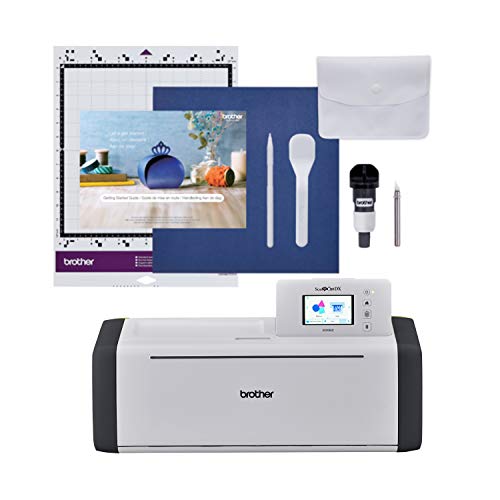 Brother SDX85C Brother SDX85C | $299.10 | 251 | Not listed | Not listed | 3.5 in touchscreen | 3 mm | Price |
 Brother SDX125E Brother SDX125E | $449.99 | 682 | 100 | 9 | 5 in touchscreen | 3 mm | Price |
 Brother SDX325 Brother SDX325 | $899.99 | 1,303 | 140 | 17 | 5 in LCD touchscreen | 3 mm | Price |
Beginner
Beginner ScanNCut: SDX85C, about $299
The lowest-cost way into scanning and cutting, with the same core scanner as the pricier models.
Brother ScanNCut SDX85C Cutting Machine
$299.10Built-in scanner, 251 designs, a 3.5 in touchscreen, an auto blade that senses thickness up to 3 mm, and USB plus wireless. Ideal for paper crafts, vinyl, felt and simple applique shapes.
Best for: Paper, vinyl and simple fabric
Check pricePrices change often, so confirm on Amazon. As an Amazon Associate we earn from qualifying purchases.
Intermediate
Intermediate: SDX125E, or a Cricut Maker 4 if you do not need a scanner
The SDX125E is where the ScanNCut becomes a quilter's tool. The Cricut is included for readers deciding between scanning and a wider tool range.
Brother ScanNCut SDX125E Cutting Machine
$449.99682 designs including 100 quilt patterns, 9 fonts and a larger 5 in touchscreen that is easier to read and edit on than the SDX85C screen.
Best for: Quilters on a budget
Check price
Cricut Maker 4 Smart Cutting Machine
$299.99No scanner and it needs an app, but it cuts unbacked fabric with a rotary blade and supports engraving and debossing tools. Better for crafters who cut many material types.
Best for: Non-scanning alternative
Check pricePrices change often, so confirm on Amazon. As an Amazon Associate we earn from qualifying purchases.
Expert
Expert: SDX325, plus an AccuQuilt for batch cutting
For quilters and applique makers who cut often. If you mostly cut paper and vinyl, do not buy the SDX325: its extra quilt patterns and fabric blade are its main advantages, and the SDX85C cuts paper and vinyl just as well.
Brother ScanNCut DX SDX325 Cutting Machine
$899.991,303 designs including 140 quilt patterns, 17 fonts, a Thin Fabric Auto Blade for quilting cuts, blade sensing up to 3 mm and wireless connectivity.
Best for: Quilters and applique makers
Check price
AccuQuilt GO! Big Electric Fabric Cutter Starter Set
$699.99Not a ScanNCut, but a common partner: the electric die cutter handles stacks of up to 6 layers for repetitive squares and strips, while the ScanNCut handles fussy cuts and custom shapes.
Best for: Pairing for batch cuts
Check pricePrices change often, so confirm on Amazon. As an Amazon Associate we earn from qualifying purchases.
Which Brother ScanNCut is best?
Choose by how much fabric you cut. All three models scan, cut materials up to 3 mm thick and design on their own touchscreens. The differences are the design library, quilt patterns, screen size and the fabric blade.
| If you mainly... | Best model | Why |
|---|---|---|
| Cut cardstock, vinyl and stickers | Brother SDX85C | Same scanner, lowest price |
| Make occasional applique and felt projects | Brother SDX85C or Brother SDX125E | Choose the SDX125E if a 5 in screen matters |
| Quilt regularly with pieced blocks | Brother SDX125E | 100 quilt patterns and a 5 in screen |
| Fussy cut, applique and quilt often | Brother SDX325 | Thin Fabric Auto Blade, 140 quilt patterns |
| Want the largest built-in library | Brother SDX325 | 1,303 designs and 17 fonts |
How does the ScanNCut scanner work?
You place a drawing, printed template, photo or piece of fabric on the cutting mat and feed it into the machine. The ScanNCut scans the whole mat and shows it on the touchscreen. From there it can trace the outlines automatically so you cut the exact shape, or show the scanned image as a background so you can position built-in designs precisely on the material you loaded.
- Fussy cutting: scan a printed fabric and cut neatly around a motif, such as a flower or animal, for applique.
- Hand-drawn templates: draw an applique shape or a child's artwork on paper, scan it and cut it from fabric or felt.
- Precise placement: see your fabric scraps on screen and nest shapes to waste less fabric.
This is the main reason crafters who do not want to use design apps choose a ScanNCut over a Cricut. See Cricut vs Brother ScanNCut for the rest of the comparison.
Is the Brother ScanNCut good for quilting?
Yes, especially the Brother SDX125E and Brother SDX325. Their built-in quilt patterns let you cut block pieces directly, you can add a seam allowance around shapes, and the scanner shines for applique and fussy-cut centers. The SDX325's Thin Fabric Auto Blade is designed for quilting cotton. The limit is volume: a ScanNCut cuts one layer at a time, so for dozens of identical squares or strips, a die cutter or a rotary cutter is faster.
Plan block sizes with the quilt block size calculator and triangle cuts with the half-square triangle calculator. Our best fabric cutting machine for quilting roundup compares ScanNCut against die cutters directly.
What materials can a Brother ScanNCut cut?
Every current ScanNCut senses material thickness and cuts up to 3 mm. Results depend on the right mat, blade depth and backing, so test on scraps.
| Material | How well it cuts | Tip |
|---|---|---|
| Quilting cotton | Very well with the right setup | Use the fabric blade on Brother SDX325, or back fabric with fusible for applique |
| Felt | Well | Stiffer craft felt cuts cleaner than soft wool blends |
| Adhesive and heat transfer vinyl | Very well | Mirror iron-on designs before cutting |
| Cardstock and paper | Very well | Use the standard mat and a lighter blade setting |
| Fusible web on fabric | Very well | Fuse before cutting so edges do not fray |
| Craft foam and thick materials up to 3 mm | Varies | Slow the speed and test cut; very spongy materials compress |
If you want to apply iron-on designs you cut, pair the machine with a press from our best heat press for crafts roundup.
Is a ScanNCut worth it for embroidery and sewing?
For sewists, many owners find it earns its place. It cuts applique pieces, felt shapes, fabric labels and iron-on vinyl for garments, and the scanner turns paper patterns and hand-drawn shapes into exact cuts. Machine embroiderers commonly use a ScanNCut to cut applique fabric pieces that sit inside embroidered satin borders, a neat way to combine the two hobbies. If you are building a Brother sewing room, see our best Brother embroidery machine roundup and the applique for beginners guide.
How we chose
We did not test these machines in person. Picks are based on Brother's published specifications for designs, quilt patterns, blades and screens, owner manuals, current Amazon pricing and recurring themes in verified owner reviews about scanning accuracy, fabric results and ease of use. We weighted fabric performance heavily because most of our readers sew and quilt.
Buying tips
- Choose the SDX325 only if fabric is central to how you will use it.
- A 5 in screen (SDX125E and SDX325) is noticeably easier to read and edit on than 3.5 in.
- Budget for replacement mats and blades; worn mats cause most cutting problems.
- Keep fusible web on hand for applique; it gives the cleanest fabric edges.
- Keep a rotary cutter for straight strips; see best rotary cutters.
Frequently asked questions
What is the difference between the ScanNCut SDX125E and SDX325?
The SDX325 adds a Thin Fabric Auto Blade designed for quilting cotton, nearly twice as many built-in designs at 1,303 versus 682, 140 quilt patterns versus 100, 17 fonts versus 9, and wireless connectivity. Both have a 5 in touchscreen, a built-in scanner and cut materials up to 3 mm. The SDX325 costs about $900 and the SDX125E about $450.
Do you need a computer for a Brother ScanNCut?
No. A ScanNCut works entirely from its own touchscreen: you can choose built-in designs, edit and resize them, scan drawings or fabric and cut, all without a computer, tablet or phone. Brother also offers free design software for creating and transferring your own designs if you want more control, and wireless models such as the SDX325 make that transfer simpler.
Is a Brother ScanNCut better than a Cricut?
It is better for crafters who cut a lot of fabric, want to scan drawings or printed fabric, or prefer not to use design apps. A Cricut Maker is better for crafters who cut a wide variety of materials and want engraving, debossing and a large online project library. Both handle vinyl, paper and felt well. Your main material usually decides it.
Can the ScanNCut cut fabric without stabilizer?
It depends on the fabric and the blade. The SDX325 includes a Thin Fabric Auto Blade designed for quilting cotton, which many quilters use on a high-tack mat. For applique, and for thin or loosely woven fabrics on any model, fusing a paper-backed fusible web or using a fabric support sheet gives cleaner edges and stops fraying. Always run a test cut on a scrap first.
Which ScanNCut is best for beginners?
The SDX85C is the best ScanNCut for beginners on a budget at about $299, with the same built-in scanner, 251 designs and an auto blade that senses material thickness. If you plan to quilt or read small screens with difficulty, the SDX125E is worth the extra money for its 5 in touchscreen and 100 built-in quilt patterns.
How thick a material can a ScanNCut cut?
All current Brother ScanNCut DX models, including the SDX85C, SDX125E and SDX325, cut materials up to 3 mm thick, and their auto blades sense the thickness so you do not set blade depth by hand. That covers cardstock, vinyl, felt, fabric and thin craft foam. For thicker leather, wood or chipboard, a Cricut Maker with specialty tools is the better fit.
How we research: we compare manufacturer specifications, owner manuals, published standards and recurring themes in verified owner reviews. We do not test products in person, and this is researched guidance, not professional advice. Follow your machine manual and pattern, and take care with rotary cutters, hot irons and needles. As an Amazon Associate we earn from qualifying purchases.